Switch from Viasat
Switching from Viasat to Starlink, step by step
Check your term and fee, set Starlink up beside Viasat, and leave Viasat in the right order, without a surprise bill for the leased parts.

Answer first · current to
If you switch from Viasat to Starlink, expect much less lag and no data threshold: in Ookla’s US tests for Q1 2026, Starlink’s median lag was 39 ms against 750 ms for Viasat. Before you order, check whether your Viasat plan has a term (Essentials does, Unleashed doesn’t) and whether Starlink can see enough sky from your yard. Then run both side by side, move your phone number if you have Viasat Voice, cancel, and get the modem and transceiver back to Viasat within 30 days.
Is it worth switching from Viasat to Starlink?
For most Viasat homes, yes. The change people notice first is lag (latency): the pause before anything starts to load. It’s what makes video calls talk over each other and online games unplayable. Viasat’s satellites orbit far higher than Starlink’s, so every click makes a much longer trip. Why satellite internet lags
US median lag (latency), Q1 2026
- Starlink
- 39 ms
- Viasat
- 750 ms
US median download speed, Q1 2026
- Starlink
- 127.39 Mbps
- Viasat
- 41.05 Mbps
Medians from Ookla’s US satellite report (Q1 2026). Ookla measured them before a new Viasat satellite went live: Viasat's ViaSat-3 F2 satellite entered service over the Americas on Sept 17, 2026. Your own results depend on your plan, your sky and the time of day.
Upload, which carries your side of a video call and every photo you send, shows the widest gap: Ookla’s median was 21.46 Mbps for Starlink and 0.95 Mbps for Viasat.
Data is the other big change. Viasat Essentials comes with 150 GB of High-Speed Data a month, then unlimited Standard Data that Viasat may put behind other customers when the network is busy. Starlink lists unlimited data on every Residential plan, though speeds can dip at busy hours. How the data rules compare · Starlink vs Viasat, row by row
What leaving Viasat costs
It depends on your plan and your address: Viasat service can be month to month, 12 months or 24 months, depending on the plans offered at your address.
- Essentials has a minimum term of 24 months. Leave early and the fee is $15 for each month left in your minimum term; no fee on month-to-month plans.
- Unleashed and Unleashed Max are month to month. You can cancel them without a termination fee.
Your service start date is on your Viasat bill and in your online account. Count the months since then, or let the fee calculator do it. If your term ends within a few months, waiting is usually cheaper: each month you wait takes $15 off the fee, though you keep paying Viasat’s monthly price meanwhile.
Three more costs to plan for:
- The last month. You pay the full month you cancel in; no partial-month refund. Cancelling near the end of a billing month wastes less.
- The equipment. The parts you lease for $15/mo have to go back after you cancel. If they don’t, Viasat charges up to $500 for current ViaSat-3 equipment: $100 for the WiFi Gateway 3 modem, $350 for the Tria 3 transceiver and $50 for the power adapter.
- Starlink’s first bill. The kit (bought or rented), the first month at the rate starlink.com quotes for your address, shipping and tax. See it added up
If you’re weighing whether to stay instead, remember Viasat’s first-year prices don’t last. Viasat’s regular prices are $69.99 (Essentials), $99.99 (Unleashed) or $179.99 (Unleashed Max) a month after the first 12 months, plus the $15 monthly lease.
Reality check
Keep Viasat for now if…
- Your Essentials term ends within a month or two. The fee drops by $15 for every month you wait.
- The Starlink app finds trees or buildings in the way at every spot you could mount the dish. Viasat only needs one clear line to the southern sky; Starlink needs much more of it.
- You mostly email and browse, you rarely hit Viasat’s data line, and the bill suits you. A connection that works at a price you’re happy with is a fine reason to stay.
- An alarm panel or another device depends on your Viasat Voice line, and you haven’t yet found a phone service it works with.
- Cable or fiber is being built to your road. A wired connection is usually steadier and cheaper; wait and compare when it arrives.
How to switch from Viasat to Starlink, in order
This order keeps you online the whole time and keeps the stretch where you pay for both services short.
- Term and feeEssentials or Unleashed?
- Sky checkStarlink app
- Orderstarlink.com
- Set upViasat still on
- Evening testsseveral days
- Move your numberif you have Voice
- Call Viasatcancel
- Return partswithin 30 days
Find out whether you have a term
10 minutesLook up your plan name on your Viasat bill or account. Essentials comes with a term; Unleashed and Unleashed Max don’t. Some addresses get other terms; your agreement says which one you have. If you’re in a term, work out the fee from the months left (see what leaving costs), or ask Viasat for the exact figure.
Check that Starlink can see enough sky
15 minutesYour Viasat dish needs an unblocked view toward the southern sky: one narrow line to a single satellite. Starlink’s dish has a 110° field of view and talks to satellites crossing the whole sky, so a tree on the north side that never bothered Viasat can cause dropouts. Starlink’s help center puts it this way: Starlink wants as much open sky as it can get, though a dish with part of its view blocked often still works.
Download the Starlink app before you order and stand where the dish would go. The Starlink app helps you pick an install spot and check for obstructions that could interfere with service. Will Starlink work where the Viasat dish is?
An old satellite dish only needs a clear line to one spot low in the southern sky. Starlink needs most of the sky above the dish, so a tree that never bothered the old dish can still cause dropouts. Order Starlink for your address
5 minutesOn starlink.com the address comes first and the price second: US Residential prices vary by region. The plan cards you see are the prices for your home. The screenshot shows them for a public test address in Broken Bow, Nebraska; by comparison, with no address entered, Starlink’s US national order list showed Residential 100 Mbps at $49.50, 200 Mbps at $76.50 and Max at $143 a month on Nov 3, 2026; prices vary by address, and starlink.com shows yours once you enter it. Choose a plan and the kit, then open the order summary to see what you pay today and when the first month is charged.
Your first service charge lands on the earliest of three dates: activation day, the 7th day after delivery, or the 30th day after shipping when no delivery date is recorded (Starlink calls this the 'Payment Due Date'). Pick a delivery week when you’re at home. When to order, and the order-day checks
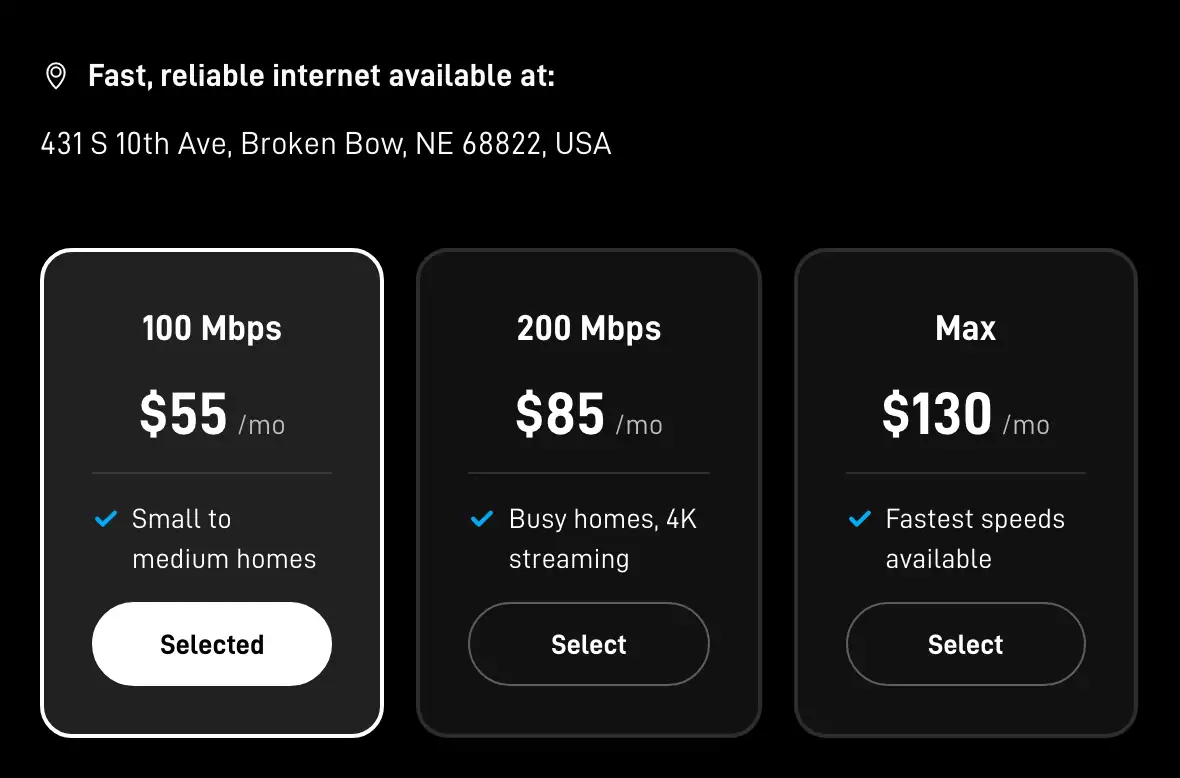
- Plan cards
Put Starlink up beside the Viasat dish, not on it
day 1Leave the Viasat dish, its cable and the modem exactly as they are. Pick a spot with open sky, plug in, and the dish finds satellites in a few minutes; current kits don't point themselves, so you rotate the dish the way the Starlink app's alignment screen tells you. For the test weeks, the kickstand on the ground or on a flat spot the app approves is enough; a permanent mount can wait until you’ve decided.
Once installed, Starlink maps the obstructions around it, mostly within a day, and routes around them better as the map fills in, so give it a day before you judge the dropouts. Keep two Wi-Fi names while you test, so you always know which service a device is on. Day-one setup
Compare the two in the evening
several eveningsBoth services slow down when the most people are online, and Starlink’s peak hours are 6 pm to 11 pm local time. Judge them inside that window, several evenings in a row, from one device in one spot. Viasat’s weakest point is usually upload (Ookla’s median: 0.95 Mbps), so send a video, back up some photos and hold a video call, not just a download test.
Home internet is busiest in the evening, when most households are online. A test at 3 am can look much better than what you get at dinner time. Your safety net if Starlink doesn’t hold up at your home: a kit bought on starlink.com and sent back undamaged inside 30 days of your Payment Due Date earns a full refund, first month's fee included. A rented kit you decide against has a tighter deadline: if you change your mind about a rental, the kit has to go back in good shape no later than 7 days after it arrives.
Move your phone number first, if you have Viasat Voice
before you cancelViasat sells Voice, a home phone add-on, for $35 a month plus taxes and 911 fees. It runs over your Viasat connection, so plan on it ending when your Viasat internet does. Starlink won’t replace it: no Starlink Residential plan includes home phone or voice service; Starlink sells internet service.
To keep the number, choose a new phone service (a mobile carrier, or a VoIP service that runs over Starlink), then start the port with the new phone company and give it your 10-digit number. The FCC’s advice: keep your old phone service until the new company has started moving your number. Call Viasat only after a test call rings on the new service. Keeping your number, step by step
Cancel Viasat by phone
one callYou can cancel by phone or in writing; Viasat doesn't accept cancellation by email or chat. The customer care number is 1-855-463-9333. Pick a cancel date near the end of your billing month, because the month you cancel in is billed in full. That day, give Starlink’s Wi-Fi your old Viasat network name and password, and most devices reconnect on their own.
Expect an offer to stay, sometimes more than one. You can say no and repeat the date you want. Before you hang up, ask for your exact termination fee, the date of your final bill and a list of the parts to send back, and write down the rep’s name, the date and the confirmation number. What to say on the call
Get the leased parts back to Viasat in time
within 30 daysCall Viasat within 7 days after service ends to arrange the return; the modem and transceiver must reach Viasat within 30 days or unreturned-equipment fees apply. Viasat either sends return instructions or, at its option, a prepaid shipping package. The details, and the one part people get charged for, are just below.

Returning Viasat’s equipment without a charge
This is where switchers lose money. Two deadlines start when your service ends: call Viasat within 7 days to arrange the return, and make sure the parts reach Viasat within 30 days.
These parts always go back, because the agreement charges for each one that doesn’t:
- the modem (Wi-Fi gateway): $100 if it’s missing
- the transceiver, the box at the front of the dish’s arm: $350
- the power adapter: $50
The transceiver is outside, on the dish. If you can’t reach it safely, ask Viasat about a technician visit and what it costs before you climb a ladder.
- Lay every part on a table and photograph it, with each label and serial number readable.
- Photograph the packed box, then the sealed box with its label on.
- Get a receipt when you drop it off, and keep it with the tracking number until your final Viasat bill shows nothing owed.
If a charge for a “missing” part shows up anyway, here’s how to dispute it. Deadlines for other providers: returning old internet equipment.
Things that trip up Viasat switchers
Reusing the Viasat pole or roof mount
Only once Viasat confirms the mount doesn’t have to go back. Otherwise, use Starlink’s own: Starlink sells a range of mounts in its online shop (once your kit is ready to ship), and the Standard kit comes with a detachable kickstand for quick setup or a permanent install. Starlink's US order list carries three home kits: the Standard 4 X, the Standard 4 and the V5, and only some come with a pipe adapter; the order page shows which kit your address gets. A pole that suited a dish aimed low at the southern sky may also be in the wrong spot for Starlink’s wider view, so check it with the app first.
Your own router or mesh Wi-Fi
Viasat’s modem goes back, but a router or mesh system you bought yourself comes along. Will it work with Starlink? Yes: you can use your own router or mesh system; on a Standard kit you run Ethernet to your router's WAN port and turn on bypass mode if your router should run the Wi-Fi (older Standard Actuated kits need Starlink's Ethernet Adapter).
Paying twice for a short while
Expect one or two weeks of overlap while you test. That costs less than cancelling Viasat early and finding out the best mounting spot is blocked. The switch planner puts every date in order for you.
What switchers ask
Can I switch from Viasat to Starlink without paying a fee?
Yes, if you’re on Unleashed or Unleashed Max, or your Essentials term has ended: month-to-month Viasat service has no termination fee. Inside a term the fee is $15 for each month left. The leased equipment still has to go back either way.
Should I cancel Viasat before Starlink arrives?
No. Keep Viasat until Starlink is set up and has done well on several busy evenings, and until your phone number (if you have Viasat Voice) has moved. Only after that, call to cancel.
What Viasat equipment do I have to send back?
At least the modem, the transceiver and the power adapter. Viasat’s own pages disagree about the dish, mount and cables, so ask on the cancel call and note the answer. Parts must reach Viasat within 30 days.
Can I put Starlink on my Viasat dish mount?
Only after Viasat confirms you don’t have to return the mount, and only if the Starlink app shows a clear view from that spot. Starlink sells its own mounts. Checking the old dish spot
Is Starlink faster than Viasat?
In Ookla’s US medians for Q1 2026, yes: 127.39 Mbps download against 41.05 Mbps for Viasat, and far lower lag. Viasat added a satellite after that period, so test both at your home in the evening before you cancel. Full comparison
Will my Starlink price go up after a year, like Viasat’s?
Starlink’s home prices are set by address, and in some areas Starlink gives new customers a lower service price for a set time (6 or 12 months, for example), and the order page shows it. If your address gets such a price, the order page shows it. For other changes, Starlink promises a month's notice, at minimum, before any change that is materially worse for you. Press reports say Starlink plans to review its address-based prices about every quarter, and that they can go down as well as up.
Where these facts come from
We took every figure and rule on this page from the pages below; the oldest reading dates from . Terms move often, so confirm with the provider before you cancel or order.
- Customer Agreement (Residential), Version 9.22
- Home Satellite Internet FAQ
- Legal Disclaimers (Residential and SMB)
- Ookla's 2026 US Starlink speed report
- Porting: Keeping Your Phone Number When You Change Providers
- SpaceX Introduces Dynamic Starlink Pricing, With Changes of Up to 20% (Drive Tesla)
- Standard 4 X spec sheet (PDF)
- Starlink app listing, Apple App Store
- Starlink specifications (US legal document)
- Starlink support: do you need a mount
- Starlink support: first-time setup
- Starlink support: moving your service address
- Starlink support: obstruction check before install
- Starlink support: promotional pricing terms
- Starlink support: reading the obstruction map
- Starlink support: renting a kit
- Starlink support: Residential plans
- Starlink support: the referral program
- Starlink support: using your own router
- Starlink terms of service (US)
- Starlink's US Residential price list (no address)
- Starlink's US Roam price list (no address)
- Viasat satellite internet plans
- ViaSat-3 F2 Enters Service, Expanding Capacity and Enabling Growth Across the Americas
- Why are my speeds slow outside or during peak hours? (Starlink help center)
Checking method: each price, fee and rule here links to the provider’s or regulator’s own page, dated the day we read it. No internet provider pays for a place on this site; the only income is the Starlink referral explained on our money page. Our fact-checking · How we make money · Corrections