Switch timing · order day
Order Starlink before you cancel your old provider
Order early, cancel late: the overlap that keeps you online, and the checks to make on starlink.com before you pay.
Answer first · current to
Order Starlink while your old internet still works, and cancel the old provider only after Starlink has passed a few busy-evening tests and any landline number has moved. Expect a few weeks of overlap: Starlink shows an estimated shipping timeline on your order page (account or app) and says it will tell you if it changes; it publishes no typical number of days to ship, delivery then takes 3 to 7 days in the US after it ships (Starlink's average-to-maximum), and service switches itself on 7 days after delivery if you haven't activated it by then. That first charge also starts Starlink’s 30-day return window.
On order day, starlink.com hides Residential prices until you type in an address (US Residential prices vary by region). Using a referral link? Complete the order in the tab it opened, and wait for Starlink’s green check panel before paying.
Before you start
Check these before you order
- The sky check is done. Starlink needs a wide view of the sky, not just the gap your old dish looked through. Scan the exact spot with the Starlink app before you pay. Checking the old dish spot
- You know what leaving costs. In a HughesNet or Viasat contract, look up this month’s fee. If the term ends within a month or two, waiting may cost less than leaving now. Fee calculator
- Your old service stays on. Cancel nothing today. Keep your current internet, and any phone line on it, working until Starlink has done well on a few busy evenings. Plan your dates
- You’ve picked where to buy. Store kits are the same hardware, but the referral reward only counts when you order both kit and service straight from starlink.com, not from a store, an unauthorized reseller or a private seller.
When should you order Starlink if you’re leaving another provider?
As soon as the sky check passes and you know your exit fee, and before you cancel anything. Starlink doesn’t publish a typical shipping time (checked Nov 3, 2026), delivery adds 3 to 7 days in the US after it ships (Starlink's average-to-maximum), and billing starts within a week of delivery whether or not the dish is up. Ordering first leaves room for setup, several evening tests and a number port while the old service is still paid for.
- Orderold service still on
- Shipsdate in your account
- Deliveredby the carrier
- Set upbefore billing starts
- Evening testsseveral evenings
- Move the numberif you have a landline
- Cancel the old serviceafter Starlink passes
- Return old gearbefore its deadline
The switch planner turns this into dates: enter the day you order and your current provider, and it lists the setup deadline, test evenings, cancel day and equipment-return deadline.
What to check on starlink.com on order day
The screenshots below were taken on Nov 3, 2026 with a public building in Broken Bow, Nebraska, as the address, through a referral link. Your prices and the page layout can differ: Starlink changes both, and it sets prices by address.
Arrive through the link, and stay in that tab
1 minuteA referral link is optional; plain starlink.com works for ordering too. If you use one, starlink.com opens with a green banner at the top (mark 1).
- One tab. Starlink.com’s page code, as we read it on Oct 29, 2026, keeps the referral in the tab the link opened and nowhere else; that is our observation, not a stated Starlink policy, so keep the whole order in that tab.
- No later fix. The order screens we checked have no field for entering a referral code afterwards, and Starlink won’t add a referral to an order afterwards.
Reading Starlink’s help pages while you order? Use a separate tab: some Starlink help pages link to starlink.com with a stranger’s referral code built in, and following one inside your order tab replaces your referral with theirs (how we read starlink.com’s code).
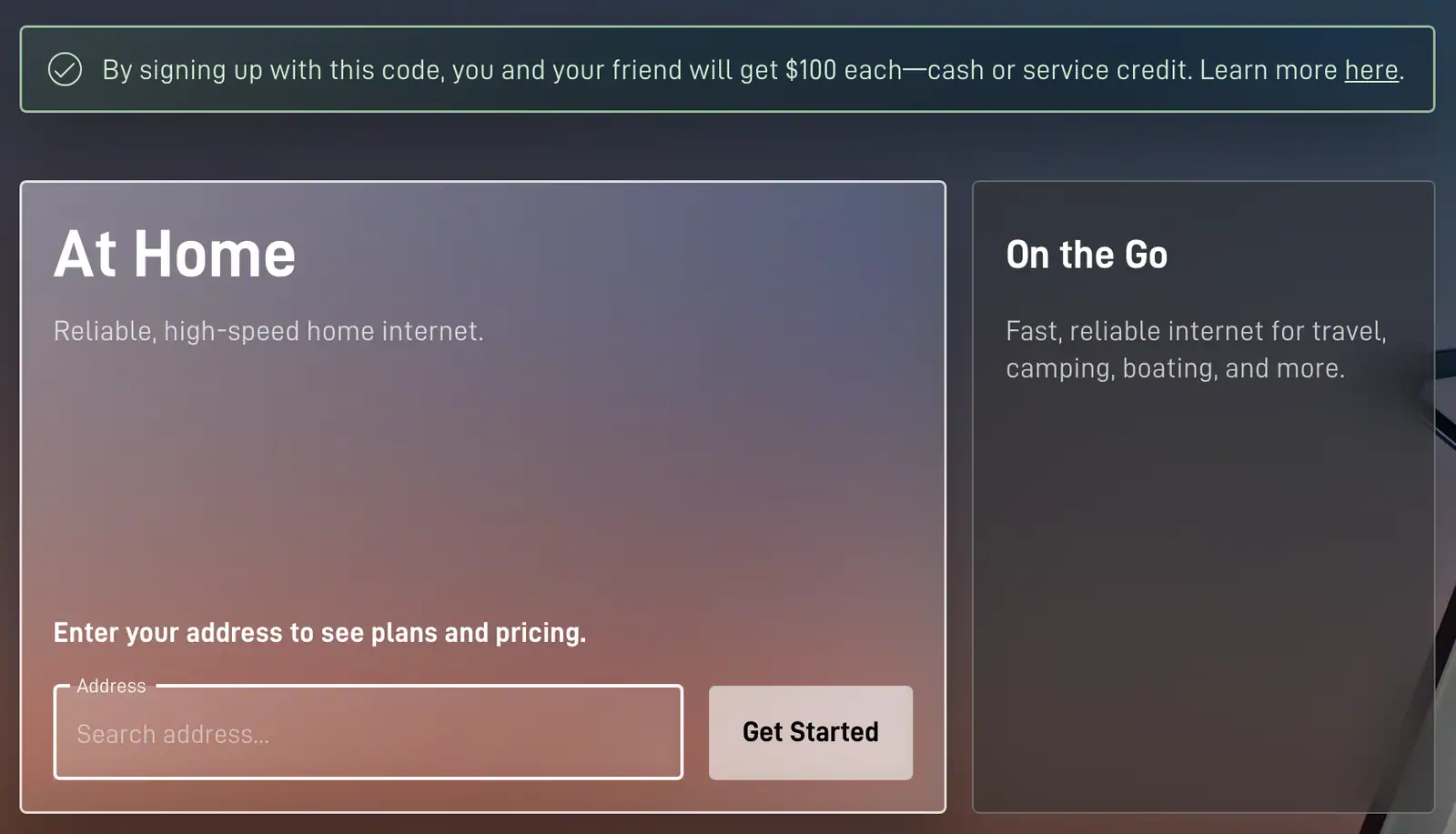
- Referral banner
- Address box
Type the service address, where the dish will sit
1 minuteType the service address under “At Home” and choose the exact match from the suggestions. Look-alike streets can appear in that list.
This is the step that sets your price. Starlink.com hides Residential prices until you type in an address, and US Residential prices vary by region. For Residential 100 Mbps, the price is set by address: since Oct 29, 2026, Starlink’s price data has listed Residential 100 Mbps at more than one monthly rate.
Service is tied to that address, and moving later can bring a different price.
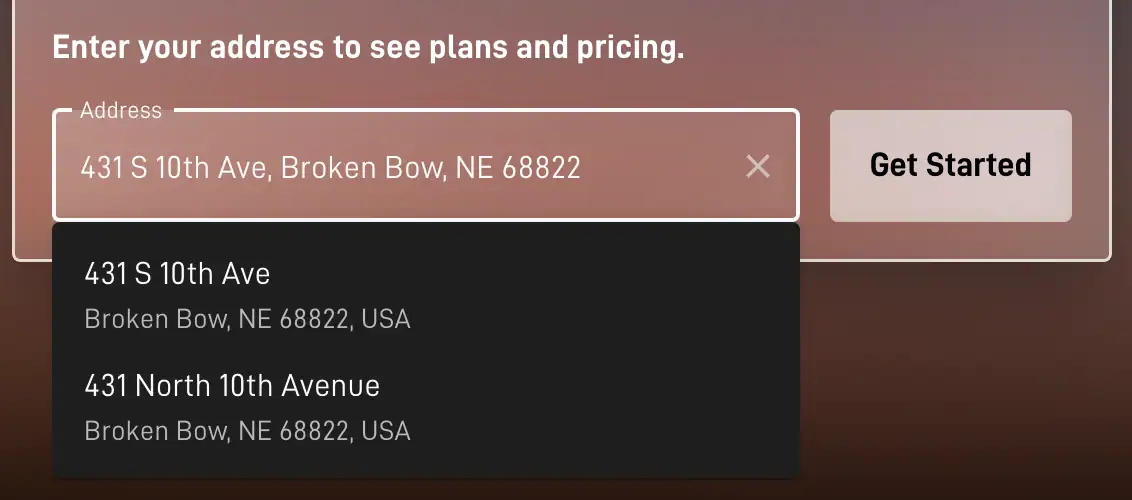
- Address typed
- Suggestion to pick
Choose a plan you’ll keep
2 minutesData isn’t what separates the three plans: Starlink lists unlimited data on every Residential plan. Speed and busy-hour priority are. Starlink says only some areas can get the 100 Mbps and 200 Mbps Residential plans, so you may see fewer than three.
Starlink’s three home plans What we compare 100 Mbps 200 Mbps Max SpeedStarlink’s plan page Download capped at 100 Mbps and upload up to 15–35 Mbps, and it can be slower than Residential Max at peak hours Download capped at 200 Mbps and upload up to 15–35 Mbps, and it can be slower than Residential Max at peak hours Typical downloads reaching 400+ Mbps, uploads of 20–40 Mbps, and first place in line among Residential plans when the network is busy Usually enough forour plain-words guide One to three people: browsing, video calls, streaming on one or two screens at a time. A busier home: several people streaming or working at once, big game or photo downloads. Heavy use every evening, or a home that wants the most speed and priority Starlink sells. Starlink's Specifications expect 80–100 Mbps download on Residential 100 and 80–200 Mbps on Residential 200, 15–35 Mbps upload on both, and send you to the coverage map for Residential Max. Your own speed also depends on your sky view and the time of day. Starlink’s plan terms say speeds can slow during network congestion and peak hours, Residential 100 and 200 Mbps slow down sooner than Residential Max, and Starlink may cut the speed of households that use far more than a typical home. Its peak hours are 6 pm to 11 pm local time, when most families are online, so test at those hours before you cancel anything.
Prices, dated: With no address entered, Starlink’s US national order list showed Residential 100 Mbps at $49.50, 200 Mbps at $76.50 and Max at $143 a month on Nov 3, 2026; prices vary by address, and starlink.com shows yours once you enter it. For comparison, starlink.com still quoted $55, $85 and $130 monthly for those plans that day on the order page of one public test address, a courthouse in Broken Bow, Nebraska (the national prices until about Oct 25, 2026). Elsewhere, press checks found Residential prices up to 20% above or below the standard price, depending on the address.
Plan changes are possible later, but rental customers may be blocked from changing plans, and a mid-cycle plan change can bring prorated charges for the old and/or new plan.
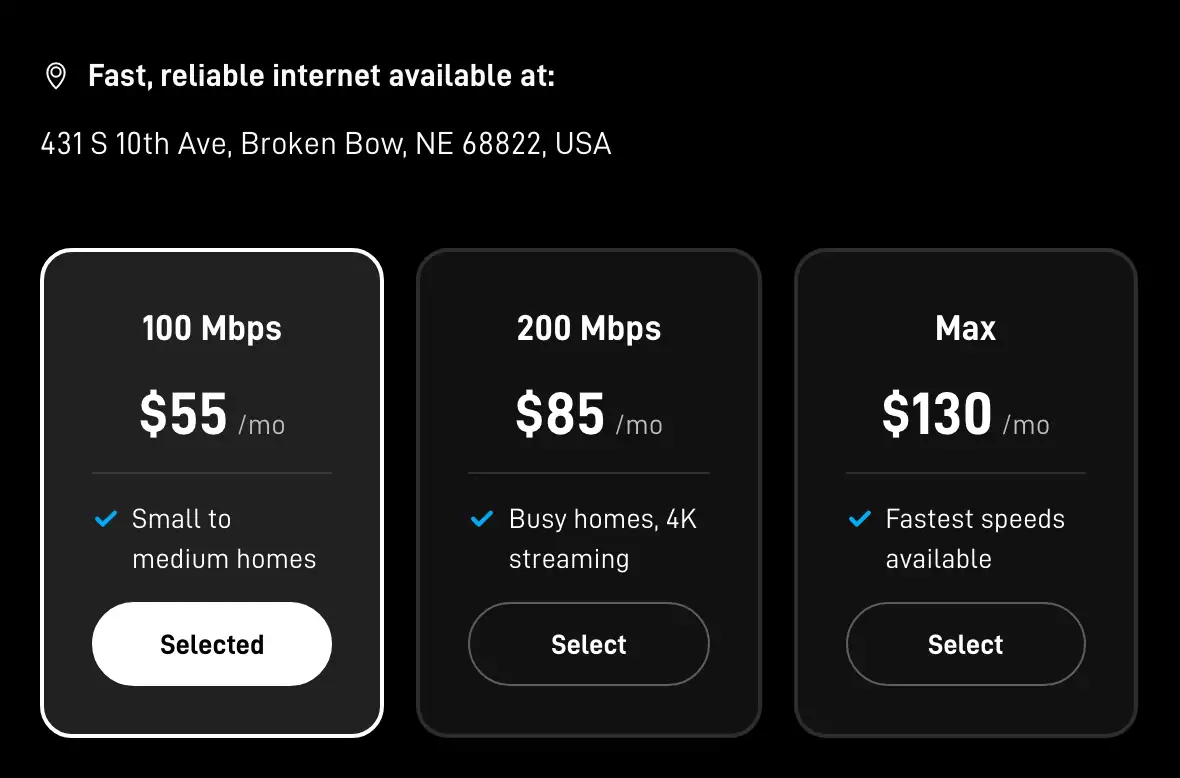
- Plan cards
Decide: own the kit or rent it
1 minuteWhich dish comes with the plan depends on the plan and the address. Starlink's US order list carries three home kits: the Standard 4 X, the Standard 4 and the V5.
Buying means the kit is yours, at $349 on Starlink’s list. Renting starts with a one-time $0, $99 or $199 set by address and plan (the $99 adds professional installation; the $199 is a rental kit that includes it). You may not get a choice: on Nov 2 and again on Nov 3, 2026, every Residential plan on Starlink’s no-address US list (100 Mbps, 200 Mbps, Max) came as a rental, and our test address was offered rental kits only.
- A rented kit remains Starlink’s property, and ownership doesn’t pass to you.
- Starlink’s order page says a monthly rental fee, if there is one, appears on the checkout screen and is billed on activation, or on day 30 after delivery if that comes sooner. At the public address we checked, it was $0/mo.
- After cancelling: after you cancel, a rented kit has 30 days to reach Starlink in good condition; otherwise you're billed its full retail price.
- Rental-kit customers can't pause service, and rental customers may be blocked from changing plans. Rental customers can buy their kit by support ticket.
- Still unclear is whether US Residential kit rentals carry a 12-month commitment: one Starlink help article says they do, while the rent article and the Terms of Service don't mention one. Look for any commitment line in the order summary before paying.
Read the summary, check the referral panel, then pay
3 minutesThe summary has two parts, and only one is charged today:
- Recurring Monthly Payment: the plan, plus a rental line if you rent. Not charged today: the order summary bills month one of service on activation, or on day 7 after delivery if that comes sooner.
- One-Time Payment: the kit or rental activation, shipping and tax, shown as “Total Due Today”; an online order is charged at checkout.
Lines that appear at some addresses: a demand surcharge (in congested areas Starlink bills a one-off demand surcharge at purchase or activation, its size depending on the address and plan, up to about $1,500 in Starlink’s invoice glossary); an activation or installation charge (a one-time activation charge can apply, depending on plan and kit; it is refunded with a 30-day return); area pricing (an area offer, if your address has one, appears on starlink.com’s order page once you enter that address, and a plan change, a cancellation or a suspension ends that discounted price); and taxes (Starlink may add taxes and legally required fees on top of service, kit and accessory charges).
With a referral link, check the panel next: once the referral is attached, the Checkout button gets a green box beside it with the words “Referral Code Applied” (below it on a computer, above it on a phone).
- Green: the link is attached. Qualifying is a separate question: only Starlink rules on whether an order qualifies, and that ruling is final.
- Amber: when the referral fails (an invalid code, or one that doesn’t fit that kind of order), an amber panel reading “Referral Code Not Applied” shows instead, and the order can still be placed, just with no reward.
- Nothing at all: this tab has lost the referral. Reopen the link and redo the order in the new tab before paying.
Then pay. Starlink takes most credit and debit cards, Apple Pay, Google Pay and PayPal; US Residential accounts can pay by bank account (ACH direct debit). No paper checks; some prepaid and debit cards get declined. The account is in your name: the account must be in your own name (household members may help). Use one email address you check, every time: a second Starlink account can be created by accident (another email address or a browser autofill). A card hold isn’t a second charge: card authorizations are not charges and drop off in 3–7 days.
After the first bill, later bills come on the same day each month, the anniversary of the Payment Due Date. Starlink lists a new kit as a reason a bill can differ: the first bill is often prorated.


After you pay: your order details show the order’s status, which moves from Pending to Preparing Shipment to Shipped (with a tracking link). An order can be changed or cancelled only while it shows Pending, often only 1–3 hours; the updates Starlink allows while an order is Pending include changing the shipping address or cancelling the order. Once an order ships, Starlink points you to the delivery carrier to manage the delivery. Before it arrives, Starlink's order confirmation tells buyers to download the Starlink app before the kit arrives to make sure trees, poles and other obstructions won't interrupt service.
When should you cancel your old internet after ordering Starlink?
Only after three things are true: Starlink is installed at its final spot, it has held up on several evenings at Starlink’s peak hours (6 pm to 11 pm local time), and any landline number on the old service has finished moving. For most switchers that lands a few weeks after order day (our reading, Nov 4, 2026). Cancel earlier and a bad spot or a slow port leaves you offline.
- HughesNet: the fee for your month and what goes back are on How to cancel HughesNet. Cancelling the internet also ends HughesNet Voice, so port that number first.
- Viasat: contract or month-to-month, and the leased parts to return, on How to cancel Viasat.
- DSL or 5G home internet: deadlines and boxes by provider on Returning old equipment.
- A landline on the old line: the safe order is on Keeping your home phone number.
If Starlink doesn’t work at your home: the 30-day return
The return window is a safety net for a home where Starlink turns out not to work, such as a sky view that’s more blocked than the app suggested. It isn’t a trial month: Starlink says the 30-day trial is a hardware trial, not a free first month.
- A kit you bought: a kit bought on starlink.com and sent back undamaged inside 30 days of your Payment Due Date earns a full refund, first month's fee included.
- A rented kit: sending a rented kit back inside 30 days of your Payment Due Date refunds its activation price, not a kit price; a timely return also refunds the first month's service or rental fee and the demand surcharge. Starlink’s rental article gives a shorter limit: if you change your mind about a rental, the kit has to go back in good shape no later than 7 days after it arrives. Until Starlink says which applies, go by the shorter one.
- Either way: a kit return needs the subscription cancelled first. You don't get shipping and handling back, even when you return the kit. After a return, Starlink takes up to 2 weeks to start the refund, then 10–15 business days at the bank.
Those limits run from the “Payment Due Date”, the first bill. In Starlink’s terms, your first service charge lands on the earliest of three dates: activation day, the 7th day after delivery, or the 30th day after shipping when no delivery date is recorded (Starlink calls this the 'Payment Due Date'). Keep the box and packing until you’ve decided, and set Starlink up soon after delivery so a problem shows early. This is one more reason to keep the old service until the tests are done.
Getting the kit from a store instead
Starlink sells on starlink.com and through the retailers on its US list (Amazon, Best Buy, Home Depot, Sam’s Club, Walmart and Leading Edge Retailer); hardware from sellers that aren’t on its list can’t be activated. It’s the same hardware, with three differences for a switcher:
- Billing can start the day you activate: activate a kit from a store on a new account and month one is billed right away.
- No referral reward: only sign-ups made on starlink.com earn rewards, so a kit from a reseller, a retailer or an account transfer doesn’t.
- Returns: a kit from a store is returned to that store, on the store’s terms.
Timing mistakes that cost switchers money
- Cancelling the old service on order day. Shipping can take longer than hoped, and the best dish spot can turn out to be blocked. Keep the old service until Starlink has done well on several evenings. Plan the overlap
- Leaving the order tab. As the first order-day check explains, the referral is tied to the tab the link opened. Finish the order there.
- Skipping the summary. A demand surcharge, an installation add-on or a rental line can be in the list. Read every line first. What switching costs, line by line
- Leaving the kit in its box. Billing starts by itself about a week after delivery, set up or not.
- Porting the phone number last. Starlink sells internet only. If a landline or HughesNet Voice runs on the old service, move the number before cancelling. Keep your phone number
Order timing questions
How long does it take to get Starlink once ordered?
Starlink shows an estimated shipping timeline on your order page (account or app) and says it will tell you if it changes; it publishes no typical number of days to ship. Once the kit ships, delivery takes 3 to 7 days in the US after it ships (Starlink's average-to-maximum). You can follow the order in your Starlink account, and the carrier handles the delivery itself. Plan for a few weeks of overlap with your old internet, so setup and the evening tests happen while the old service is still on.
Should I cancel my old internet before Starlink arrives?
No. Keep it until Starlink is installed at its final spot, has held up on several busy evenings and any landline number has moved. Billing on Starlink starts within about a week of delivery either way, so paying for both services for a couple of weeks is the normal cost of a switch without a gap.
Is it too late for a referral once I’ve ordered?
No: Starlink won’t add a referral to an order afterwards, and the order screens we checked have no field for entering a referral code afterwards. Open the referral link before you start, keep the order in that one tab, and make sure Starlink’s green panel says “Referral Code Applied” before paying.
Should I buy Starlink at a store or online?
The hardware is the same, so it comes down to timing and the reward. Activate a kit from a store on a new account and month one is billed right away, while a starlink.com order is billed from activation or about a week after delivery. And only sign-ups made on starlink.com earn rewards, so a kit from a reseller, a retailer or an account transfer doesn’t.
Is there a referral code for people switching from HughesNet?
Not from Hughes. EchoStar agreed in 2025 to a fee-based program for referring Hughesnet customers to Starlink, but when we checked on Nov 3, 2026, none of Hughes, EchoStar or Starlink had published a launch date, an offer or any terms. A referral link from any current US Starlink customer works the same way for a first-time customer, and this site isn’t part of any Hughes program.
Is there an extra charge to get Starlink at my address?
Sometimes: in congested areas Starlink bills a one-off demand surcharge at purchase or activation, its size depending on the address and plan. Starlink’s invoice glossary caps it at roughly $1,500. If your address carries one, it gets its own line on the summary screen, ahead of payment, so you can stop there and keep your current provider.
Does Starlink do a credit check?
Starlink’s US help center and legal documents mention no credit check before ordering, though its Terms of Service let it report money owed for a broken service commitment to a credit reporting agency.
Can I order Starlink in the app?
With a referral link, finish in that same browser tab, because it isn’t confirmed whether moving to the Starlink app partway through keeps a referral you started in a browser. Without one, ordering anywhere works the same. Either way, use the app afterwards for the sky scan, setup and support.
Where these facts come from
We took every figure and rule on this page from the pages below; the oldest reading dates from . Terms move often, so confirm with the provider before you cancel or order.
- Billing - Unknown Charges (Starlink help center)
- Can I delay the shipment of my order? (Starlink help center)
- EchoStar Corporation Form 8-K (SpaceX spectrum purchase agreement)
- How does the monthly service billing cycle work? (Starlink help center)
- Once shipped, how long will it take for my order to be delivered? (Starlink help center)
- Order Overview (Starlink help center)
- Our starlink.com order-page screenshots for a Broken Bow, NE test address (no order placed)
- Refunds (Starlink help center)
- RV Mobile Internet on Starlink's address-based price test (Oct 2026)
- Starlink Payment Methods (Starlink help center)
- Starlink plan descriptions (US legal document)
- Starlink referral terms (US legal document)
- Starlink specifications (US legal document)
- Starlink support center, full article set (479 articles, read Oct 29, 2026)
- Starlink support: account questions
- Starlink support: activation charge for store kits
- Starlink support: demand surcharges
- Starlink support: invoice line glossary
- Starlink support: moving a kit to another country
- Starlink support: moving your service address
- Starlink support: price adjustments
- Starlink support: promotional pricing terms
- Starlink support: renting a kit
- Starlink support: Residential plans
- Starlink support: returning a kit
- Starlink support: the referral program
- Starlink terms of service (US)
- starlink.com front page as a US visitor with no address
- starlink.com order screens and page code (our reading, no order placed)
- starlink.com order-page prices for a public test address in Austin, TX (no order placed)
- Starlink's US Residential price list (no address)
- Starlink's US Roam price list (no address)
- What is an 'Activation Charge'? (Starlink help center)
- When can I expect my order to ship? (Starlink help center)
- Who is a Starlink authorized retailer? (Starlink help center)
- Why are my speeds slow outside or during peak hours? (Starlink help center)
- Why can't I change my service plan? (Starlink help center)
Checking method: each price, fee and rule here links to the provider’s or regulator’s own page, dated the day we read it. No internet provider pays for a place on this site; the only income is the Starlink referral explained on our money page. Our fact-checking · How we make money · Corrections